
Your full registration folio, minus the folder chaos.
Collect evidence as it happens, link it to all 37 APST Proficient focus areas, see your gaps at a glance, and export a polished folio PDF for your reviewer. It runs offline in your browser, and nothing is ever uploaded.
See the whole builder in about a minute.
From setting up your profile to the finished folio PDF, recorded straight from the builder's demo mode. No sound needed.
Great teaching. Scattered evidence.
Full registration asks you to show your practice against every Proficient Standard. The teaching is the easy part. Keeping track of it is what eats your weekends.
Evidence everywhere
Photos on your phone, a OneDrive folder called “APST stuff”, and starred emails you've already forgotten about.
No idea where the gaps are
Is 4.4 covered? What about 2.4? Without a map you only find out when your reviewer asks.
The last-minute formatting
Copying, pasting and resizing screenshots into a folio the week before your reviewer meeting.
There's a tidier way: one tab that holds every artefact, annotation and observation, and builds the folio for you.
Get the folio builderWatch your coverage grow as you add evidence.
This is the builder's coverage map, working right here. Tap an artefact to add it. Each one is linked to every focus area it shows, so one good piece of evidence lights up several cells at once.
Sample evidence 0 added
Tap to add or remove. Codes are the APST focus areas each item is linked to.
Coverage map
Tap any cell to read the focus area.
Tap an artefact on the left to see it linked across the Standards.
In the full builder you upload the actual files, write an annotation and an alignment statement for each focus area, and track observations too.
Start your own folioFour steps from scattered to submitted.
Clips from the builder's guided tour. Each step plays in turn, or tap one to jump to it.
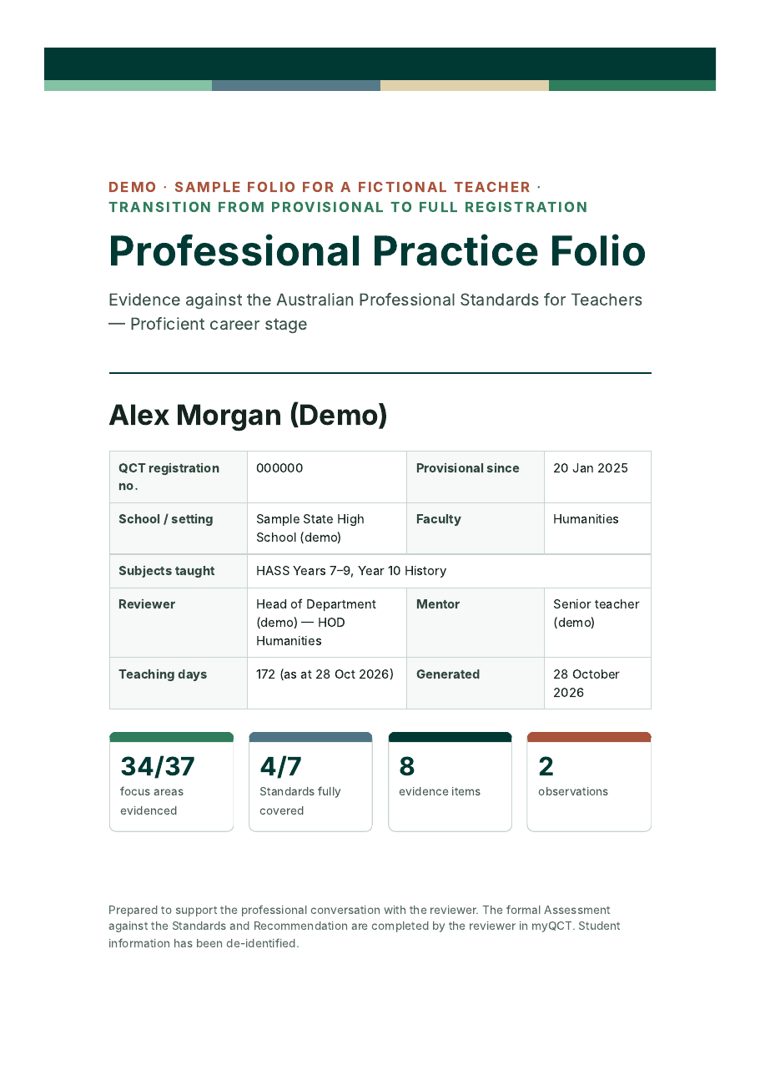
Flip through a real folio export.
These are actual pages from the demo folio the builder produces. Click a page, drag the slider or use your arrow keys to turn.
Everything a Proficient folio needs, in one tab.
Built around the 7 Standards and 37 focus areas, with the QCT pathway steps baked in.
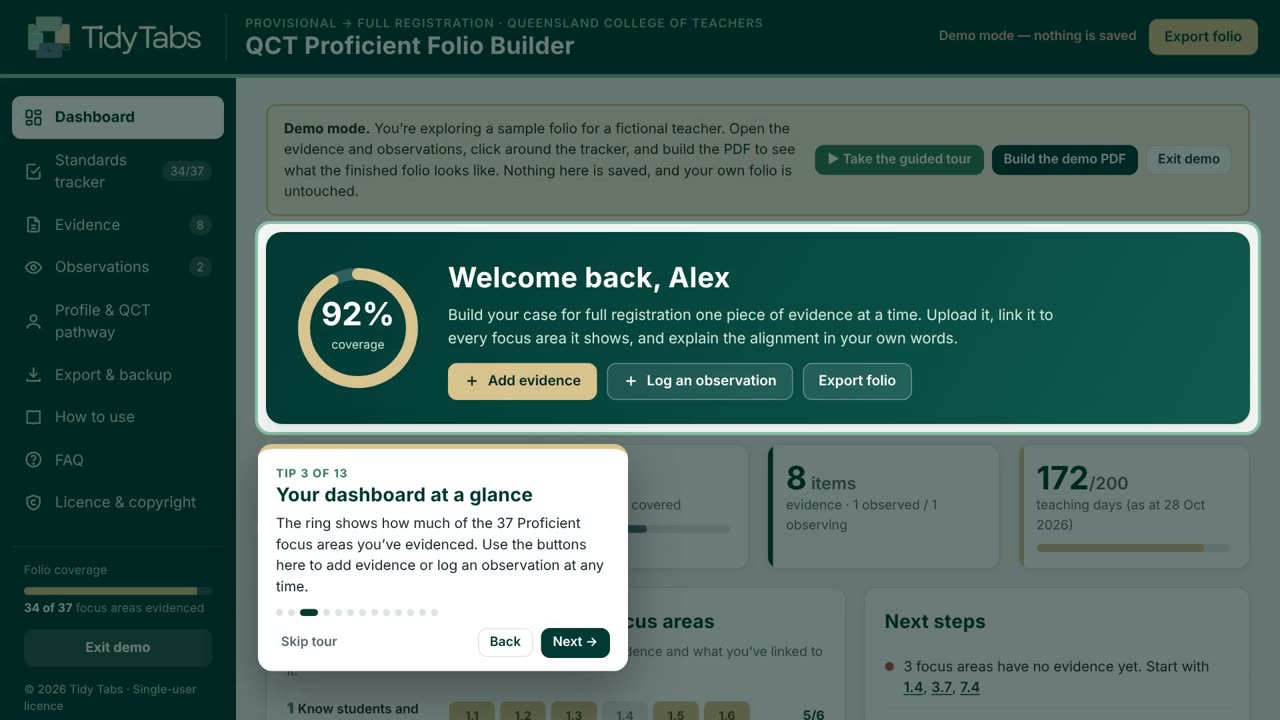
Know exactly where you stand
A coverage ring, quick stats, key QCT dates and a next-steps list that writes itself as your folio grows.
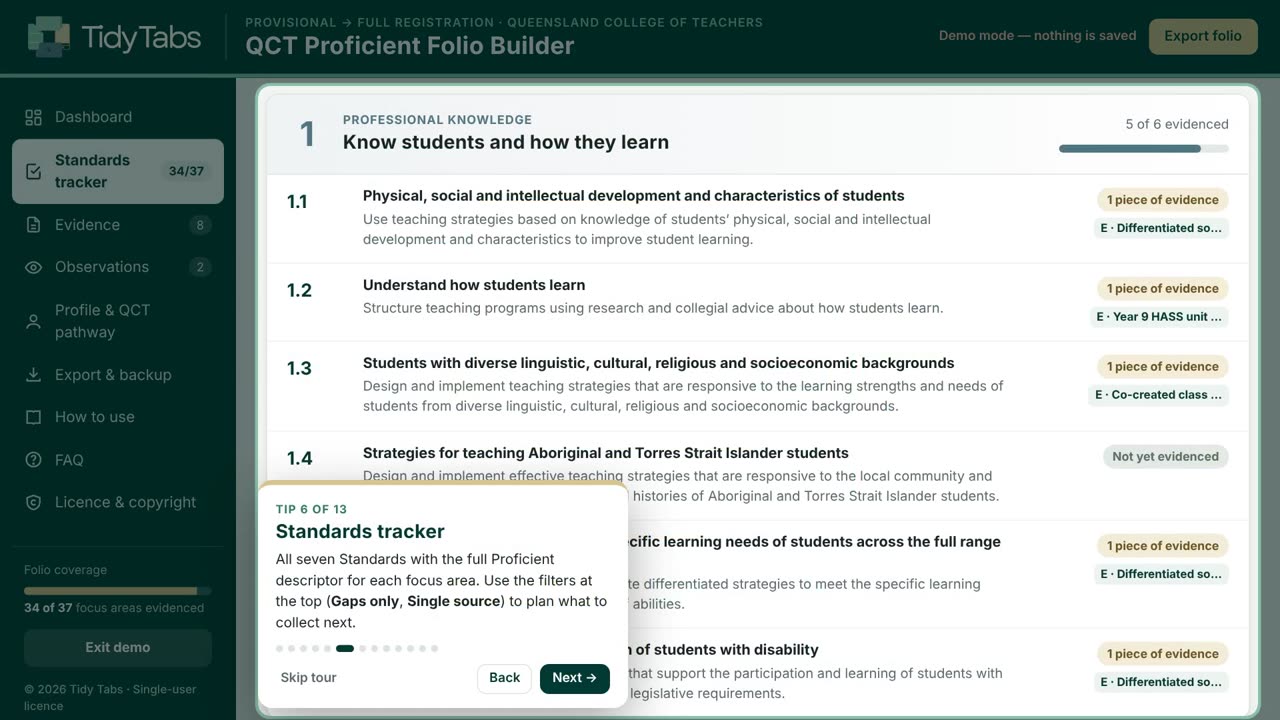
Every descriptor, every gap
All 37 Proficient descriptors with evidence ideas. Filter to gaps or single-source areas to plan what to collect next.
Alignment statements
Tick every focus area an artefact shows and explain each link in your own words, with prompts to help.
Reflections that go somewhere
Strengths, next steps and dated actions, then a follow-up on whether the change worked.
Your evidence, embedded
Photos and PDF pages appear inside the folio, captioned and cross-referenced to the Standards.
Learn it in minutes
A worked sample folio and a 13-step tour show you every feature before you start your own.
Move computers safely
One backup file holds everything, uploads included, and restores in a click.
Help when you need it
An illustrated user guide, print settings, a privacy checklist and a built-in FAQ.
Your evidence never leaves your computer.
Student work, parent emails, observation notes: the things you collect for a folio are sensitive. The builder is a single file that runs in your browser with every outgoing connection blocked, so nothing is ever uploaded.
What teachers say
Reviews come from verified buyers through our checkout provider, Payhip, and are shown word for word. Read every review
Built for Queensland. Other states on the way.
Every state and territory uses the same national Proficient Standards, but each regulator runs its own process. We're researching each one so its version gets the right checklist, dates and wording.
Teaching outside Queensland right now? The evidence tools, coverage map and Standards tracker follow the national APST, so this version already works for collecting Proficient evidence. Only the pathway checklist and key dates are QCT-specific.
Tell me when my state is readyWhat you get
- The QCT Proficient Folio BuilderOne file that opens in Chrome or Edge. Dashboard, coverage map, tracker, evidence, observations and PDF export.
- A worked demo folio + guided tourEight annotated evidence items, two observations and the finished PDF to learn from.
- 14-page illustrated user guideStep-by-step help, print settings, privacy checklist and troubleshooting.
- Yours to keepA one-off purchase. No subscription and no account.
Made by a Queensland teacher who has been through provisional to full registration and wished this existed.Tidy Tabs builds offline tools that save teachers time. Less admin. Better outcomes. More time for teaching.
One-off payment in Australian dollars through Payhip's secure checkout. Your download link arrives by email straight away.
Each licence is for one teacher. Please don't share the file by email, USB, a school network or cloud storage. Licence terms
Before you buy
Still unsure? These are the questions teachers ask most.
Does this replace my application in myQCT?
Where is my work saved?
Will it work on my iPad?
What files can I upload?
How much evidence do I need?
I teach outside Queensland. Will it help?
Can I buy for my graduate teachers?
How do I get it after paying?
What if it doesn't work for me?
Turn this term's teaching into next term's folio.
Start collecting today and watch your coverage map turn green, one artefact at a time.